
orthodontic treatment plan viewer
Orthodontic Treatment Plan Viewer: How Doctors Review Aligner Setups Faster
How an orthodontic treatment plan viewer helps doctors review aligner setups: stage-by-stage playback, IPR, movement tables and precise change requests.
· 4 min read · DentoSim
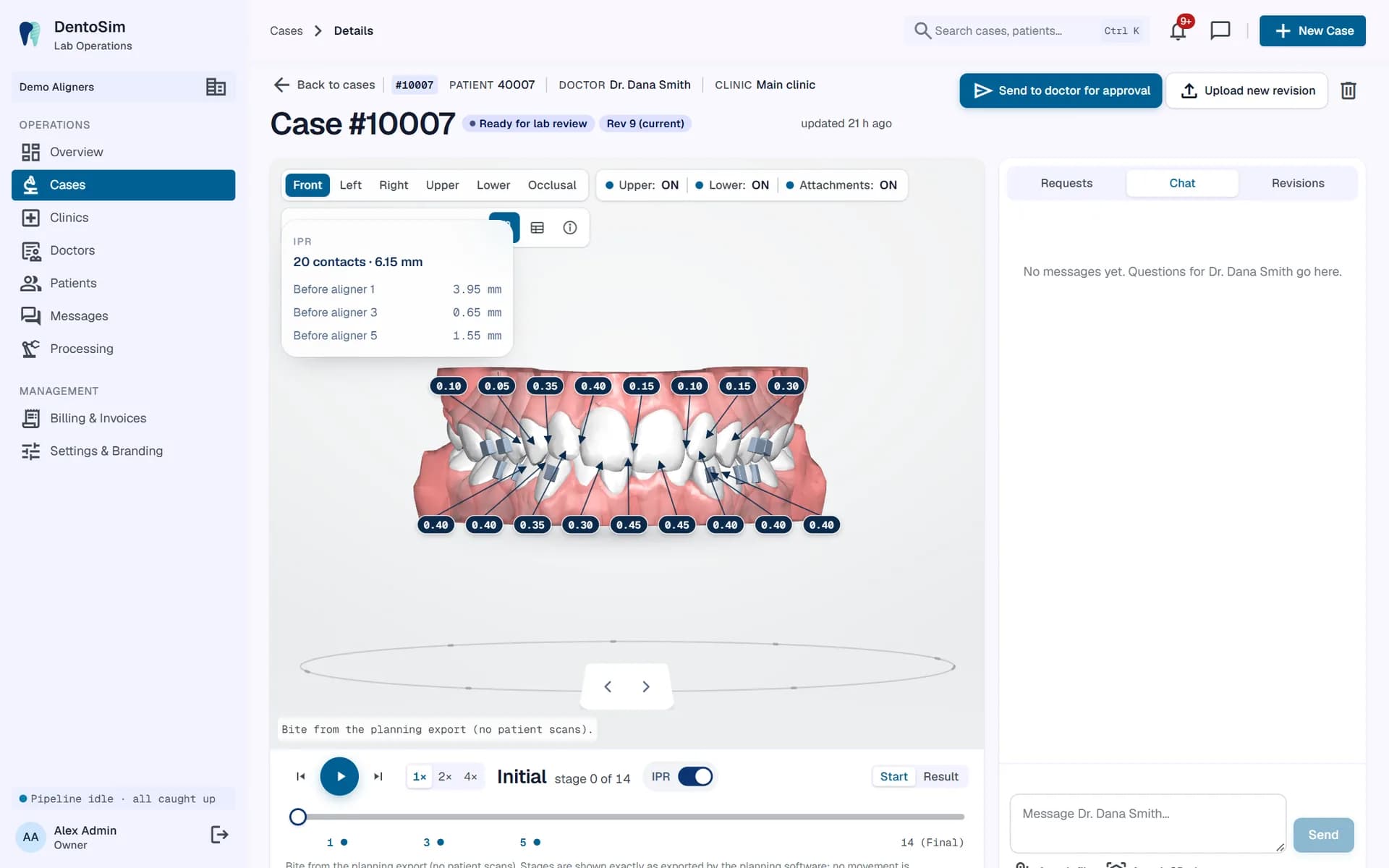
For a doctor, reviewing an aligner setup is a clinical decision, not a formality. They need to confirm that the planned movements are realistic for this patient, that the IPR is acceptable, that the attachments are where they expect, and that the final result is what they and the patient want.
An orthodontic treatment plan viewer should make that review fast and precise. This article walks through what doctors check, why traditional review methods slow everything down, and how a good viewer turns review into a quick, well-documented decision.
What doctors check in an aligner setup
Most doctors follow a similar sequence when they review a setup:
- The final result. Alignment, arch form, midlines, overjet, overbite and the overall bite, compared with the starting position.
- The path. How each tooth gets from start to finish, stage by stage. A smooth tooth movement simulation shows whether movements are staged sensibly, or whether some teeth make large jumps.
- Space management. Where space comes from: IPR, expansion, proclination or a combination. See aligner IPR visualisation.
- Attachments. Which teeth have them and from which stage, and whether they suit the planned movements. See aligner attachments in 3D.
- The numbers. Rotation, angulation, inclination and translation per tooth, from the tooth movement table, to spot any movement larger than they are comfortable with.
- The number of aligners. Whether the length of treatment fits what was discussed with the patient.
Why screenshots and videos slow approvals down
Many labs still send a set of screenshots, a PDF report or a screen-recorded video of the setup. The doctor cannot rotate the model, cannot pause at the stage they care about, and often cannot see the IPR and movement values in context.
So questions go back to the lab by email or phone. The planner replies, maybe records a new video, and the case waits. Each round trip can add a day or more. Multiply that by every case and every revision, and approval becomes the slowest part of the whole process.
What an interactive viewer changes
With an interactive viewer, the doctor answers their own questions in seconds:
- rotate to the occlusal view to check arch form;
- step to aligner 8 to see when a rotation happens;
- turn on IPR labels to see where and how much enamel will be removed;
- open the movement table to check the largest rotation;
- switch to side-by-side to compare the start and the result;
- show only the lower arch to check crowding.
Because everything is in one place, the doctor reaches a decision in one sitting, often on the same day the plan is ready.
Precise change requests
The most time is lost when a change request is vague. "Can you fix the lower incisors?" needs a follow-up call to understand what the doctor actually wants.
A good review tool lets the doctor request a change on one tooth at one stage: for example, less rotation on tooth 21 at the final stage, or less intrusion on tooth 31. The lab sees the request next to the planned value, so the planner knows exactly what to change. In DentoSim, doctors can propose changes to rotation, tip, torque and translation (mesial-distal, buccal-lingual and extrusion-intrusion). The request never alters the plan directly: the planner makes the change in the planning software and uploads a new revision.
Chat that points at the model
Not every question is a change request. Sometimes the doctor just wants to ask why a tooth moves the way it does. Chat on the case keeps that conversation with the plan. When a message mentions a stage and a tooth, opening it takes the doctor or planner straight to that point in the 3D viewer. Files and 3D views can be attached to messages too.
Approval with a clear record
When the plan is right, the doctor approves it in one click. The decision, who made it and when, is recorded against that specific revision. If the plan changes later, the new revision needs its own approval. This protects everyone: the lab knows exactly what was approved, and the doctor knows the patient will see the approved version. This is the core of a doctor approval platform for aligner labs.
Review on any device
Doctors rarely sit at a desk waiting for setups. They review between patients, at lunch or in the evening, on a phone or tablet as often as on a computer. The viewer must work properly on small screens, with touch controls that feel natural.
Notifications matter just as much. When a plan is ready, the doctor should know immediately. DentoSim's viewer runs in the browser, and doctors can also use the DentoSim app, which sends a push notification when a plan is ready for review.
Tips for labs: make review easy
- Send the plan with a short note explaining the main decisions, for example "IPR before aligners 1, 3 and 5 to resolve lower crowding".
- Use consistent attachment and IPR conventions so doctors know what to expect.
- Respond to change requests with a new revision, not a message, so the history stays clear.
- Check the simulation yourself first, on a phone, before sending it to the doctor.
See it in action
DentoSim gives every doctor a portal with an interactive 3D aligner treatment viewer, IPR, attachments, the movement table, tooth-level change requests, chat and one-click approval, all under your lab's brand. See how it works or register your lab.
Frequently asked questions
Can doctors request changes on a specific tooth?
Yes. In DentoSim the doctor can propose an adjustment to one tooth at one stage, and the lab sees it next to the planned value before uploading a new revision.
Is the approval recorded?
Yes. Each approval or change request is logged with who made it and when, against the specific revision.
Does a change request edit the plan automatically?
No. The planner makes the change in the planning software and uploads a new revision, which the doctor then reviews.
Can doctors review plans on a phone?
Yes. The viewer works in the phone's browser, and the DentoSim app adds push notifications when a plan is ready.
See it on your own treatment plans
DentoSim turns aligner treatment plans into 3D simulations for doctors and patients, under your lab's brand.