
aligner treatment simulation software
Aligner Treatment Simulation Software: What It Is and Why Aligner Labs Need It
What aligner treatment simulation software does, how it turns treatment plans into 3D simulations, and what aligner labs should look for before choosing one.
· 6 min read · DentoSim
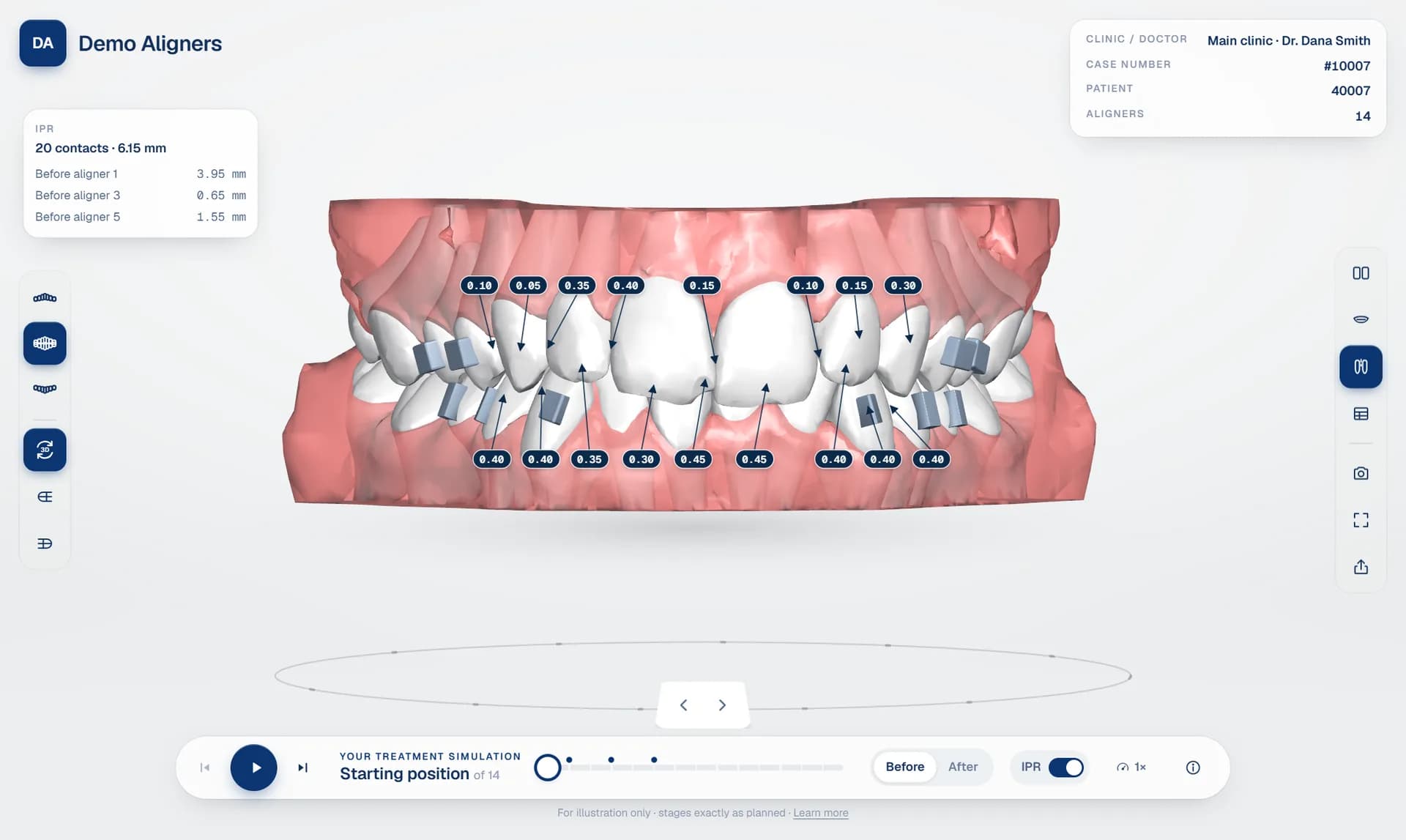
Every clear aligner case starts as a digital treatment plan: a sequence of stages that moves each tooth a small, planned distance from its starting position to the final result. That plan lives inside the treatment planning software used by the lab or the planner, and inside that software it is precise, detailed and complete.
The difficulty is everyone outside the planning software. The treating doctor has to review and approve the plan, often between patients and on a phone. The patient has to understand it well enough to say yes. Neither of them has the planning software, and neither should need it.
Aligner treatment simulation software closes that gap. It takes the exported treatment plan and turns it into an interactive 3D simulation that anyone can open in a browser, without installing anything and without training. This guide explains what that software does, why it matters to aligner labs and aligner brands, and what to look for when you choose one.
What aligner treatment simulation software does
A clear aligner simulation platform sits between your planning software and the people who need to see the plan. It does three jobs.
First, it reads the export. Planning software exports a treatment plan as a set of 3D files, often one model per stage and per jaw, sometimes with extra files for IPR and tooth movements. The simulation software works out which file belongs to which stage and which jaw, and checks that nothing is missing.
Second, it builds a 3D package. Raw exports are large and are not designed for a browser. The software separates each model into its parts (teeth, gums and attachments), compresses the geometry and produces a package that loads quickly, even on a phone over mobile data.
Third, it presents the plan. A viewer shows every stage with playback, views from every side, and the clinical details that matter: IPR, attachments and the tooth movement table. The same plan can be shown in a detailed review mode for doctors and a simpler mode for patients.
Why a simulation is better than screenshots or videos
Many labs still send screenshots, a PDF report or a screen-recorded video of the setup. These are better than nothing, but they have real limits.
- They are fixed. The doctor cannot rotate the model, stop at aligner 8, or look at the occlusal view if the video did not include it.
- They hide detail. IPR values, attachments and movement numbers are either missing or in a separate document.
- They go out of date. When the plan is revised, a new video must be recorded and sent, and it is easy for the doctor to review the wrong one.
- They do not record anything. There is no clear record of who reviewed which version, or when the patient saw it.
An interactive simulation solves each of these problems. The doctor answers their own questions by moving the model, the details are on screen, the link always shows the current revision, and every approval and view is recorded.
Why aligner labs need it
For an aligner lab or aligner brand, simulation software is not just a nicer way to show a plan. It changes how quickly cases move and how your service is perceived.
- Faster doctor approval. A doctor who can open the plan on a phone in a few seconds approves sooner than one waiting for a desktop and a video file. Shorter approval time means aligners are manufactured and delivered sooner.
- Fewer misunderstandings. When the doctor sees IPR, attachments and movements in 3D, change requests become specific: this tooth, this stage, this movement. Fewer revision rounds are needed.
- Better patient conversations. A before and after simulation helps patients picture the result. It gives the doctor a clear, professional way to explain the treatment.
- A stronger brand. Labs that send a branded, interactive link look established and modern. With a white label viewer, every simulation promotes your company rather than a software vendor.
- Less admin. Case status, revisions, approvals and patient links live in one system instead of scattered across email, chat and file-sharing services.
Who uses it, and how
The lab or planner uploads the export, checks the simulation and sends it to the doctor. They see every case across every clinic and doctor, and know at a glance what is waiting for approval.
The treating doctor reviews the plan stage by stage, checks the clinical details, requests changes on specific teeth or approves. They see only their own cases.
The patient opens a private link, usually from WhatsApp or a text message, and watches their treatment from the first aligner to the final result.
Good aligner lab software gives each of these people exactly the view they need, while keeping a single, consistent plan underneath.
Features to look for
When you compare aligner treatment simulation software, check these points carefully. Ask to test them on your own cases rather than on a demo file.
- Compatibility with your planning software. The best platforms recognise exports from the top treatment planning software automatically, and also accept staged STL, OBJ, PLY, 3MF or GLB files. When an export is unfamiliar, you should be able to map it once and have it recognised automatically from then on.
- A browser-based 3D viewer. Doctors and patients should not have to install anything. Read our guide on choosing a 3D aligner treatment viewer.
- Smooth staged animation. Teeth should glide from aligner to aligner, and the gums should move with them, rather than flicking between static models.
- Clinical detail. IPR values at each contact, attachments, and the tooth movement table from the plan. See aligner IPR visualisation and the tooth movement table explained.
- Doctor approval built in. Approval, change requests and chat should live next to the 3D plan, not in email. More in doctor approval for aligner labs.
- White label. Your logo, colours and domain, so the simulation is part of your brand. See white label aligner viewer.
- Security. Private patient links with an optional PIN and an expiry date, roles for your team, two-factor sign-in, virus scanning of uploads and an audit log. See sharing treatment plans securely.
- Clear pricing. Ideally you pay for what you use, with no large upfront licence.
Common mistakes when choosing
- Testing only on the vendor's demo case. Demo files are prepared to look perfect. Upload one of your own, ideally a difficult one.
- Ignoring the phone experience. Most patients, and many doctors, will open the simulation on a phone. Check load time and controls on a mid-range phone.
- Forgetting the doctor's workflow. A beautiful patient viewer is not enough if approvals still happen by email.
- Overlooking branding. If the viewer carries someone else's logo, you are building their brand with every case you send.
How DentoSim approaches it
DentoSim is aligner treatment simulation software built specifically for aligner labs and aligner brands. You upload the plan exported from your planning software (a zip, a folder or loose files, with resumable uploads for large exports) and DentoSim processes it automatically: virus scan, stage detection, separation of teeth, gums and attachments, and a compact 3D package.
The result is a 3D simulation with smooth playback, IPR values and the IPR protocol, attachments, and the tooth movement table from the plan. Doctors review it in their portal or the DentoSim app, request changes on a specific tooth at a specific stage, chat with your team, and approve. Patients open it from WhatsApp, a link or a QR code, protected by an optional PIN and expiry date.
Every lab starts with free cases, so you can test DentoSim on real treatment plans before paying anything. After that, pricing is per processed case, and revisions, doctors and patient links cost nothing extra. Register your lab to try it.
Frequently asked questions
Is aligner treatment simulation software the same as treatment planning software?
No. Treatment planning software is where the plan is designed. Simulation software takes the finished plan and presents it as an interactive 3D simulation for doctors and patients.
Do patients need to install an app to see the simulation?
Not with a browser-based viewer. The patient opens a link on their phone and the simulation runs in the browser.
Which file formats can be uploaded?
DentoSim recognises exports from the top treatment planning software automatically and also accepts staged STL, OBJ, PLY, 3MF and GLB files, as a zip, a folder or loose files.
How long does it take to create a simulation?
Processing is automatic and usually takes minutes, depending on the size of the export.
Can I try it before paying?
Yes. Every lab starts with free cases, so you can test it on real treatment plans.
See it on your own treatment plans
DentoSim turns aligner treatment plans into 3D simulations for doctors and patients, under your lab's brand.