
orthodontic tooth movement table
The Orthodontic Tooth Movement Table Explained
A clear guide to the orthodontic tooth movement table: rotation, angulation, inclination, mesial, vestibular and occlusal movement, and IPR per tooth.
· 4 min read · DentoSim
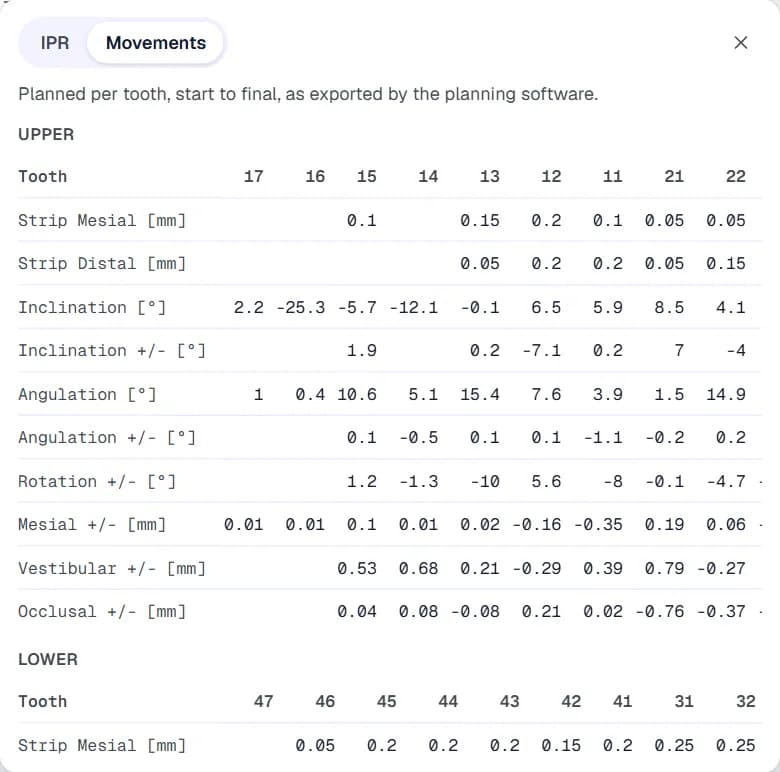
The 3D simulation shows *how* the teeth move. The orthodontic tooth movement table shows *how much*. For a doctor reviewing an aligner plan, it is the quickest way to check whether any single movement is larger than they are comfortable with, and to compare movements across the arch.
Movement tables can look intimidating at first: a grid of numbers, units and plus and minus signs. This guide explains how the table is laid out, what each row means, how to read the signs, and how to use the table together with the 3D simulation.
How the table is laid out
Each column is a tooth, and each row is a type of movement. There is usually one table for the upper arch and one for the lower arch. The values are typically the total planned change from the starting position to the final position, although some planning software can also show the change for a single stage.
An empty cell usually means no planned change for that tooth and movement, or that the value is not applicable.
Tooth numbering: the FDI system
Most tables use FDI notation, the two-digit system of the FDI World Dental Federation. The first digit is the quadrant and the second digit is the tooth, counting from the midline.
- Quadrants: 1 is upper right, 2 is upper left, 3 is lower left and 4 is lower right (from the patient's point of view).
- Teeth: 1 is the central incisor, 2 the lateral incisor, 3 the canine, 4 and 5 the premolars, and 6 to 8 the molars.
- Examples: 11 is the upper right central incisor, 23 is the upper left canine, 36 is the lower left first molar and 45 is the lower right second premolar.
The rows, one by one
Names vary slightly between planning software, but most tables include these rows:
- Strip mesial / strip distal (mm): the IPR planned on the front (mesial) and back (distal) surface of the tooth. The amount at a contact is the sum of the two facing surfaces. See aligner IPR visualisation.
- Inclination (°) and inclination change: the labial or lingual tilt of the tooth, often called torque. The first row may show the tooth's position, the second the planned change.
- Angulation (°) and angulation change: the mesial or distal tip of the crown, seen from the front or side.
- Rotation (°): rotation around the long axis of the tooth.
- Mesial (mm): movement along the arch, towards the midline (mesial) or away from it (distal).
- Vestibular (mm): movement towards the cheek or lip (vestibular or buccal) or towards the tongue (lingual or palatal).
- Occlusal (mm): movement towards the biting surface (extrusion) or away from it (intrusion).
Reading the signs
Each movement has a positive and a negative direction. For example, a positive vestibular value usually means movement towards the lip or cheek, and a negative value movement towards the tongue. A positive occlusal value usually means extrusion and a negative value intrusion.
Sign conventions can differ between planning software, and sometimes between the upper and lower arches. If a value surprises you, check it against the 3D simulation: play the treatment and watch that tooth.
What doctors look for
Doctors usually scan the table for outliers rather than reading every number:
- A rotation much larger than the others, especially on rounded teeth such as lower premolars and canines, which are harder to rotate with aligners.
- Large extrusions, which are often among the more difficult movements for aligners.
- Big inclination changes on a single tooth.
- Large translations that might need more stages or extra anchorage.
- Asymmetries between the left and right sides that do not match the diagnosis.
Those are the movements most likely to need extra attachments, more stages, overcorrection or a change of plan, depending on the doctor's clinical judgement.
Table and simulation together
The table is most useful next to the model. When a value looks large, the doctor can play the tooth movement simulation and watch that tooth, step through the aligners to see when the movement happens, and compare the start and the result side by side.
If something needs to change, the doctor can request an adjustment on that tooth, for example less rotation on tooth 44 at the final stage, and the lab sees it next to the planned value. See how doctors review aligner setups.
Where the numbers come from
The movement table should come directly from the treatment plan. Many planning software exports include a movement report alongside the 3D models. A good simulation platform reads that report as it is, with its own row names and units, and shows it next to the 3D viewer. Numbers that are retyped or recalculated elsewhere can drift from the real plan.
In DentoSim, the movement table comes straight from the planning software's export and opens from the viewer toolbar, next to the IPR tab. See the 3D viewer or register your lab to see it on your own cases.
Frequently asked questions
What does a negative value in the movement table mean?
It means movement in the opposite direction to the positive one, for example lingual instead of vestibular, or intrusion instead of extrusion. Check the planning software's sign convention.
Which tooth numbering does the table use?
Usually FDI notation, where 11 to 18 are upper right, 21 to 28 upper left, 31 to 38 lower left and 41 to 48 lower right.
Are the values per stage or for the whole treatment?
Usually they are the total planned change from start to final. Some planning software can also report per-stage values.
What does an empty cell mean?
Usually no planned change for that tooth and movement, or that the value does not apply.
See it on your own treatment plans
DentoSim turns aligner treatment plans into 3D simulations for doctors and patients, under your lab's brand.