
doctor approval platform for aligner labs
Doctor Approval Platform for Aligner Labs: Fewer Emails, Faster Approvals
How a doctor approval platform helps aligner labs get treatment plans approved faster, with 3D review, tooth-level change requests, chat and a clear record.
· 4 min read · DentoSim
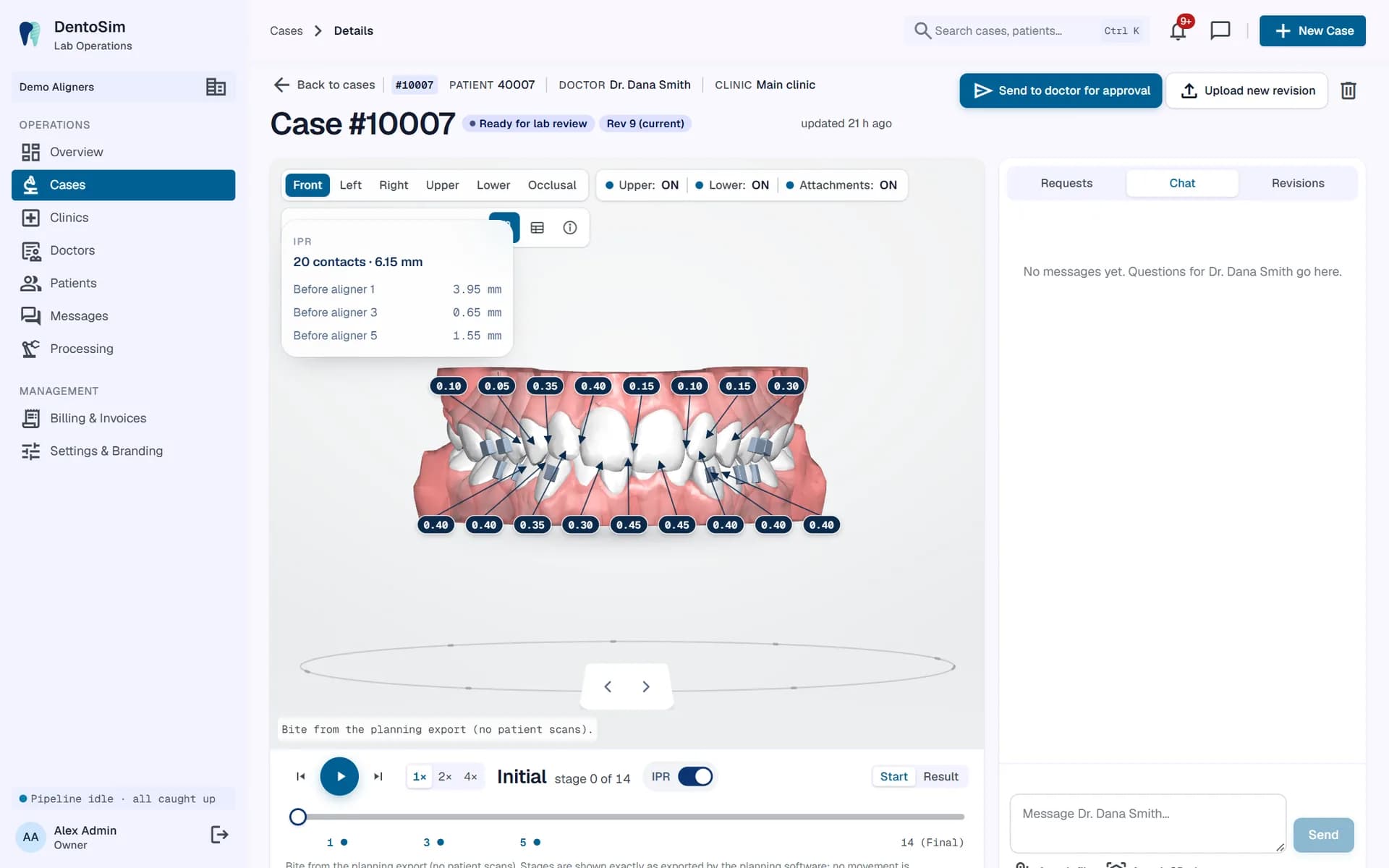
For most aligner labs, the time between "plan ready" and "plan approved" is the slowest part of a case. The plan waits in an inbox. The doctor has a question. The lab answers by phone. A new version goes out by email. The doctor reviews the wrong file. The cycle repeats.
Each round trip can add days, and every day of waiting delays manufacturing and frustrates the patient. A doctor approval platform for aligner labs shortens that loop by putting review, feedback and approval in one place, next to the 3D plan.
What slows approvals down
- The doctor cannot easily open the plan. Files need special software, or the video does not show the view they want.
- Feedback is vague. "The lower arch doesn't look right" needs a follow-up call before anyone can act on it.
- Conversations are scattered. Some feedback arrives by email, some by phone, some through a messaging app, and none of it is attached to the case.
- Versions get mixed up. Did the doctor approve revision 2 or revision 3?
- Nobody knows what is waiting. The lab has no single view of which cases are stuck with which doctor, or for how long.
- Doctors forget. Without a timely notification, a plan can sit unreviewed for days.
How a dedicated platform fixes it
- One-click access. The doctor opens the case in the browser or an app, already signed in. No downloads, no special software.
- Instant notifications. When a plan is ready, the doctor gets a notification, including a push alert on the phone if they use the app.
- Interactive 3D review with IPR, attachments and the movement table. See the orthodontic treatment plan viewer.
- Tooth-level change requests: one tooth, one stage, one movement, shown to the lab next to the planned value.
- Chat on the case, where a message that mentions a stage and a tooth opens the 3D viewer at that point.
- A clear decision: approve or request changes, recorded against the exact revision.
- A dashboard for the lab showing everything awaiting review and every change request waiting for a new revision. See aligner lab software workflow.
Tooth-level change requests in practice
The single biggest time saver is precise feedback. Instead of describing a problem in words, the doctor picks a tooth and a stage and proposes a change to one movement: rotation, tip, torque, or translation in one of three directions. For example: reduce rotation on tooth 21 at the final stage, or reduce intrusion on tooth 31.
The lab sees the request next to the value currently in the plan, so the planner knows exactly what the doctor wants without a phone call. Requests do not edit the plan directly. The planner makes the change in the planning software, where the full clinical context is available, and uploads a new revision. Several requests can be drafted and sent together, so the doctor reviews once and the lab revises once.
Revisions with a clean history
Every new version of the plan should be a new revision of the same case, not a new file in an email thread. The doctor always sees the current revision by default, and earlier revisions remain available for reference. When a revision is approved, everyone knows exactly which version that was.
Approval before the patient sees it
The safest order is: the lab prepares the plan, the doctor approves it, then the patient sees it. A platform that tracks approval per revision makes that order easy to follow and easy to demonstrate later. If a case needs to be shown to a patient before formal approval, for example in a consultation, that should be a deliberate choice, not an accident.
Doctors use it on the move
Doctors review between appointments, often on a phone. The platform must work properly on small screens, with a viewer that responds well to touch and a layout that keeps the approve and request-changes actions within reach. Push notifications make sure a plan does not wait days for a free moment at a desktop.
Measuring approval speed
Once approvals run through one platform, you can measure them. Track how long cases wait for review, how many revisions a typical case needs, and which doctors might benefit from a short walkthrough of the portal. Small changes, such as a clearer note with each plan, can noticeably reduce waiting time.
Getting doctors on board
- Create their account for them and send a short welcome message with the sign-in link.
- Show them one case on a call: how to play the plan, check IPR and approve.
- Recommend the app for push notifications.
- Keep using the platform consistently. If some plans still arrive by email, doctors will not trust that the portal is complete.
DentoSim's doctor approval workflow
DentoSim gives every doctor a portal and an app with 3D review, IPR, attachments and the movement table, tooth-level change requests, chat on every case, revision history and one-click approval, all under your lab's brand. Each decision is recorded against its revision, and your dashboard shows what is waiting for which doctor.
See how it works, read about the 3D aligner treatment viewer, or register your lab.
Frequently asked questions
Do doctors need to install software to approve plans?
No. They can approve in the browser. DentoSim also offers an app for doctors with push notifications.
What happens when the doctor requests changes?
The lab sees the request, the planner updates the plan in the planning software and uploads a new revision, which goes back to the doctor for approval.
Can a doctor send several change requests at once?
Yes. Doctors can draft several tooth-level requests and send them together as one change request.
Is each approval linked to a specific revision?
Yes. Approvals and change requests are recorded against the exact revision, with who made them and when.
See it on your own treatment plans
DentoSim turns aligner treatment plans into 3D simulations for doctors and patients, under your lab's brand.