
aligner before and after simulation
Aligner Before and After Simulations: Helping Patients Say Yes
How an aligner before and after simulation helps patients understand their treatment, and what makes an interactive orthodontic simulation easy to use on a phone.
· 4 min read · DentoSim
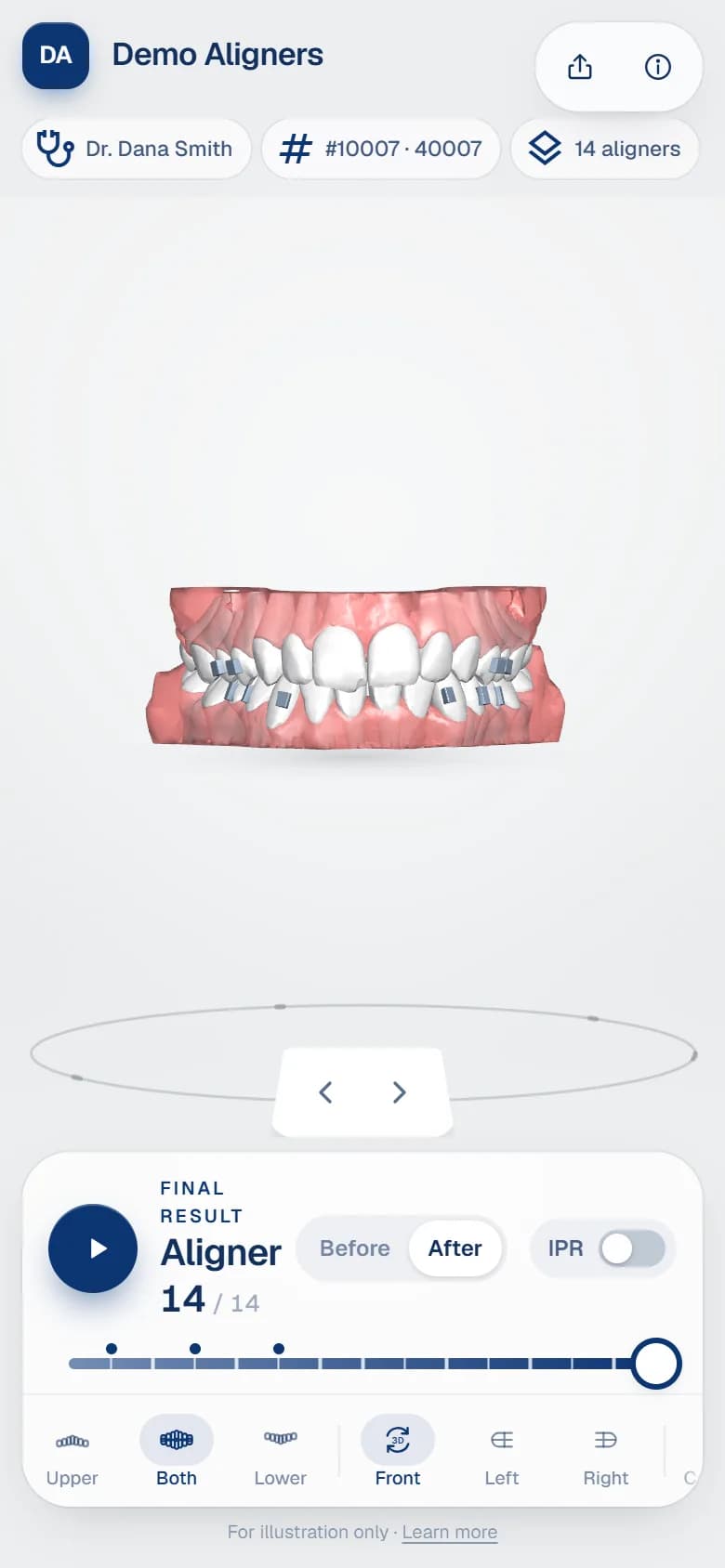
Patients do not think in stages, millimetres or degrees. They want to know two things: what their smile will look like, and roughly how they will get there. A verbal explanation, however good, asks them to imagine both. An aligner before and after simulation shows them.
This article looks at why simulations help patients understand and accept treatment, what patients actually use in a simulation, and how to share it in a way that is easy for them and safe for their data.
Why a simulation helps
- It makes the result real. Seeing their own teeth in the final position helps patients picture the outcome far more clearly than photos of other people's results.
- It explains the journey. Watching the teeth move through each aligner shows that the treatment is gradual and planned, which reassures many patients.
- It builds trust. A clear, professional simulation shows that the treatment has been planned carefully, by people who know what they are doing.
- It continues after the appointment. Many patients decide at home, after talking to family. A link they can open again, and show others, keeps the conversation going when the doctor is not there.
- It answers common questions. How long will it take? Will I have attachments? Will my teeth be straight at the end? The simulation answers much of this visually.
What patients actually use
Patient-facing viewers should be simple. A doctor needs a review tool; a patient needs a clear story. The controls patients use most are:
- Play, to watch the teeth move through every aligner in a smooth, staged aligner treatment animation.
- Before and after, to switch instantly between the starting position and the final result.
- A timeline, showing which aligner they are looking at and how many there are in total.
- A few views: front, left, right and the bite from above, plus upper or lower arch only.
- The practice's name and the doctor's name, so the patient knows who prepared the plan and whom to ask.
Anything more, such as detailed measurement tables, is usually better explained by the doctor in person, although some doctors like to show IPR to their patients. An on/off switch lets the doctor choose.
Built for phones first
Most patients open the link on a phone, often straight from WhatsApp. An interactive orthodontic simulation must be designed for that:
- Fast loading on mobile data, with a compact 3D package rather than heavy raw files.
- Touch controls that feel natural: drag to rotate and tap to play.
- A layout that fits the screen, with the model in the centre and controls within thumb reach.
- Nothing to install and no account to create.
Using the simulation in the consultation
The simulation works best as part of the conversation, not as a replacement for it. A simple approach many doctors use:
- Start with the patient's current teeth and agree on what they want to change.
- Switch to the final result and let the patient look at it from different angles.
- Play the full treatment once, so they see the teeth moving gradually.
- Show attachments and, if relevant, where small adjustments between teeth will be made.
- Send the link so they can watch it again at home.
Simulations show the plan, not a promise
A simulation shows the planned stages exactly as designed in the planning software. It is a communication tool, not a guarantee. Biology varies from patient to patient, and results depend on factors such as how consistently aligners are worn.
The treating doctor remains responsible for explaining what is realistic for each patient. The simulation helps them do it clearly. It is good practice to say this to the patient when showing the simulation.
Sharing it safely
A patient simulation is health information. Send it as a private link, never as a public post or a file attachment. Good practice is:
- a long, unguessable link for each patient;
- an optional PIN, given to the patient separately;
- an expiry date, and the ability to revoke the link;
- a log of when the link was opened.
See how to share aligner treatment plans securely for more detail.
Make it yours
The simulation is often the first piece of your brand a patient sees in detail. A white label aligner viewer shows the practice's or aligner brand's logo, colours and contact details rather than a software vendor's.
DentoSim's patient viewer is built for phones: smooth playback, before and after, simple views, and the practice and doctor names, under your brand. Links can be sent by WhatsApp, as a link or as a QR code, with an optional PIN and expiry. See the patient experience or register your lab.
Frequently asked questions
Can patients open the simulation on their phone?
Yes. The simulation runs in the phone's browser from a link, with nothing to install.
Is the simulation the guaranteed result?
No. It shows the planned stages as designed. The treating doctor explains what to expect for each patient.
How do patients receive the simulation?
As a private link sent by WhatsApp or text message, or as a QR code shown at the practice.
Can patients see their attachments?
Yes. Attachments are shown on the teeth, so patients know what to expect before they are placed.
See it on your own treatment plans
DentoSim turns aligner treatment plans into 3D simulations for doctors and patients, under your lab's brand.